Home > Features > Import Pipeline
Import Pipeline
Spotify URL import, metadata retrieval, and audio download.
Table of Contents
- Overview
- Supported URL Formats
- Pipeline Stages
- Metadata Fetch
- Audio Download
- Real-Time Progress
- Error Handling
- Storage Layout
Overview
The import pipeline accepts a Spotify URL, fetches track metadata via the Spotify Web API, and downloads the audio using spotdl. The entire pipeline runs in the background via Oban workers, with real-time progress updates pushed to the LiveView dashboard via Phoenix PubSub.
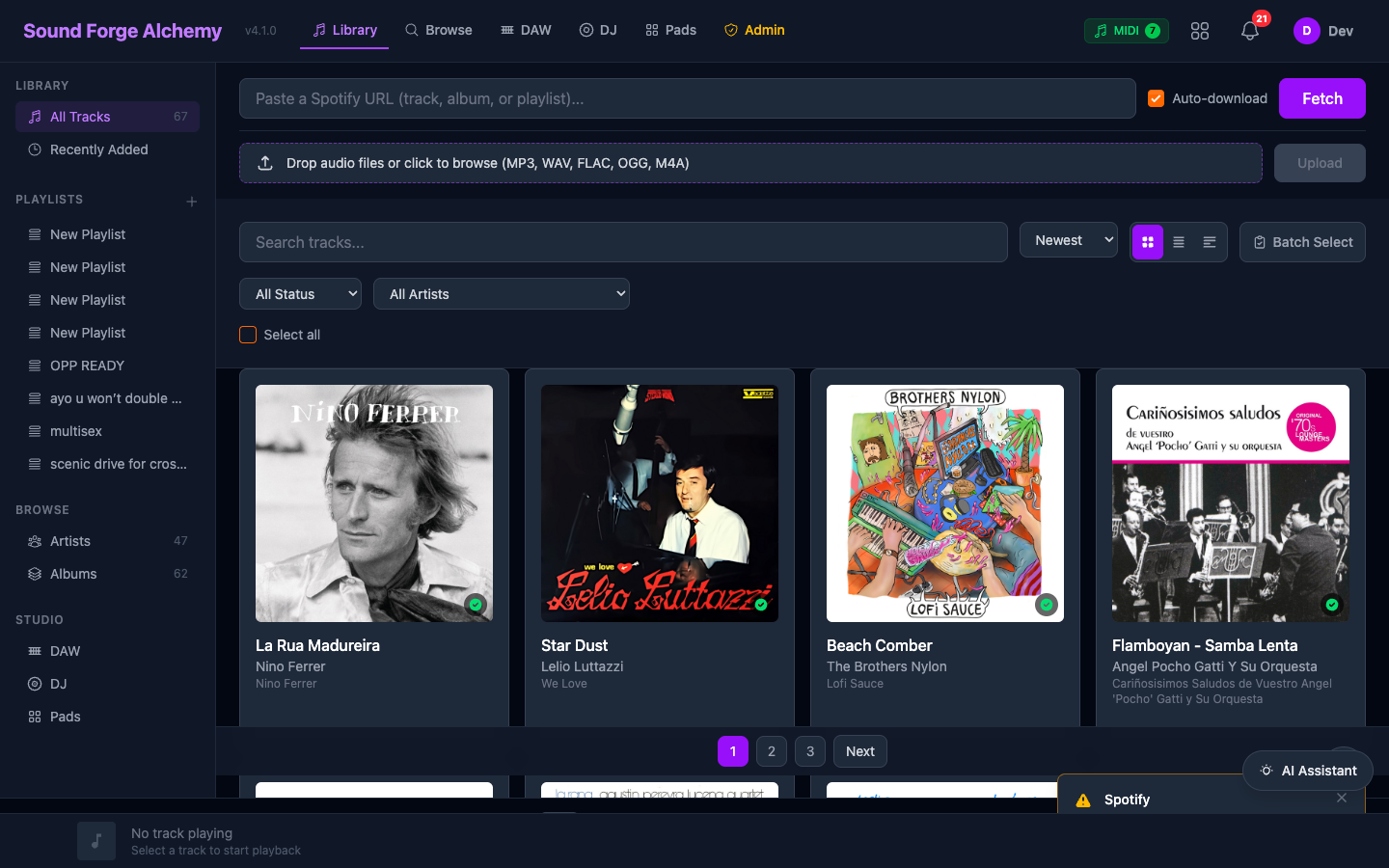 The orange “Fetch” button in the main area accepts Spotify URLs. The drag-and-drop upload zone and track library with album art are visible below.
User pastes URL
      |
 URL Parsing (SoundForge.Spotify.URLParser)
      |
 Metadata Fetch (Spotify Web API via OAuth2)
      |
 Track created in PostgreSQL
      |
 Download Job enqueued (Oban :download queue, concurrency: 3)
      |
 DownloadWorker → spotdl CLI → audio file
      |
 Track updated: output_path, file_size
      |
 PubSub broadcast → LiveView update
Supported URL Formats
The URL parser (SoundForge.Spotify.URLParser) handles all standard Spotify URL forms:
| Format | Example |
|---|---|
| Track | https://open.spotify.com/track/4uLU6hMCjMI75M1A2tKUQC |
| Album | https://open.spotify.com/album/6dVIqQ8qmQ5GBnJ9shOYGE |
| Playlist | https://open.spotify.com/playlist/37i9dQZF1DXcBWIGoYBM5M |
| International locale | https://open.spotify.com/intl-es/track/4uLU6hMCjMI75M1A2tKUQC |
| Short Spotify URL | https://spotify.com/track/4uLU6hMCjMI75M1A2tKUQC |
| Spotify URI | spotify:track:4uLU6hMCjMI75M1A2tKUQC |
The parser returns {:ok, %{type: "track" | "album" | "playlist", id: "..."}} or {:error, :invalid_url}.
Pipeline Stages
Stage 1: URL Parsing
SoundForge.Spotify.URLParser.parse(url)
# {:ok, %{type: "track", id: "4uLU6hMCjMI75M1A2tKUQC"}}
Stage 2: Metadata Fetch
SoundForge.Spotify.fetch_metadata(url)
# {:ok, %{
#   title: "Blinding Lights",
#   artist: "The Weeknd",
#   album: "After Hours",
#   album_art_url: "https://...",
#   duration: 200,
#   spotify_id: "0VjIjW4GlUZAMYd2vXMi3b",
#   spotify_url: "https://..."
# }}
For albums and playlists, the metadata fetch returns a list of tracks.
Stage 3: Track Creation
A Track record is inserted into PostgreSQL. The spotify_id field has a unique constraint — importing the same track twice returns the existing record.
Stage 4: Download Job
A DownloadJob is created and enqueued to Oban’s :download queue (concurrency: 3):
Jobs.Download.create_job(spotify_url)
# Creates DownloadJob record + inserts Oban job
Stage 5: DownloadWorker Execution
The worker:
- Updates status to
:downloadingand broadcasts0%progress - Runs
spotdlCLI with the Spotify URL - Updates status to
:completedwithoutput_pathandfile_size - Broadcasts
100%completion
On failure, sets status to :failed with an error message. Oban retries up to 3 times with exponential backoff.
Metadata Fetch
Module: SoundForge.Spotify.HTTPClient
Uses OAuth2 client credentials flow (no user account needed for metadata):
- Requests access token from
https://accounts.spotify.com/api/token - Token cached in ETS for 3500s (Spotify tokens expire at 3600s)
- Track metadata fetched from
https://api.spotify.com/v1/tracks/{id} - Album tracks from
https://api.spotify.com/v1/albums/{id}/tracks - Playlist tracks from
https://api.spotify.com/v1/playlists/{id}/tracks
The client uses a behaviour-based architecture for testability:
# Production
config :sound_forge, :spotify_client, SoundForge.Spotify.HTTPClient

# Tests
config :sound_forge, :spotify_client, SoundForge.Spotify.MockClient
Spotify OAuth (User Account)
For playback via Spotify (not just metadata), users can connect their Spotify account via the Settings page.
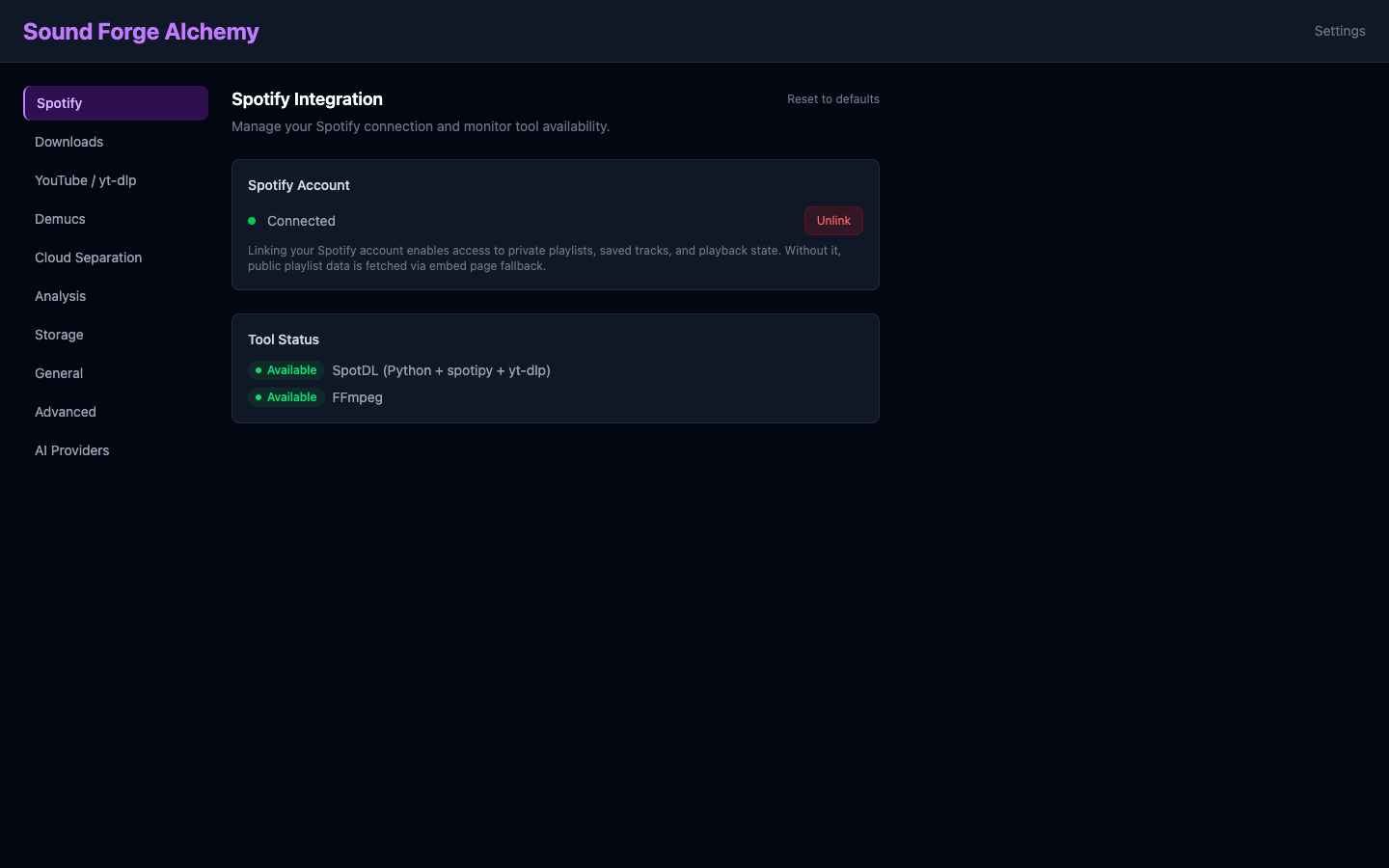 The Settings page Spotify Integration panel shows connection status (green dot = Connected) and the Unlink button. SpotDL and FFmpeg tool availability is reported in the Tool Status section.
The OAuth flow:
GET /auth/spotify— redirects to Spotify authorization- Spotify redirects to
GET /auth/spotify/callbackwith authorization code - Code exchanged for access + refresh tokens (stored encrypted)
- Tokens refreshed automatically before expiry
Audio Download
Tool: spotdl (Python CLI)
spotdl downloads audio from YouTube (using Spotify metadata for matching), then applies Spotify metadata (title, artist, album art) to the file.
Supported audio quality (configurable per user):
| Quality | Format | Bitrate |
|---|---|---|
lossless |
FLAC | Lossless |
high (default) |
MP3/AAC | 320kbps |
medium |
MP3 | 192kbps |
low |
MP3 | 128kbps |
Download Worker Configuration
# lib/sound_forge/jobs/download_worker.ex
use Oban.Worker,
  queue: :download,
  max_attempts: 3,
  priority: 1
Real-Time Progress
Progress updates are broadcast via Phoenix.PubSub to the "jobs:{job_id}" topic:
PubSub.broadcast(SoundForge.PubSub, "jobs:#{job_id}", {:job_progress, %{
  status: :downloading,
  progress: 45,
  message: "Downloading audio..."
}})
DashboardLive subscribes and updates the JobProgress component in real time.
Error Handling
| Error | Behavior |
|---|---|
| Invalid URL | Immediate error — no job created |
| Spotify API auth failure | Error returned to UI — check credentials |
| Track not available | spotdl error captured, job marked :failed |
| Network timeout | Oban retries up to 3 times (exponential backoff) |
| spotdl not found | Job marked :failed with “spotdl not found” message |
| Disk full | Job marked :failed, error logged |
Storage Layout
Downloaded files are stored under priv/uploads/:
priv/uploads/
  downloads/
    {track_id}/
      {artist} - {title}.mp3
The output_path column on DownloadJob stores the absolute path. The FileController serves files from this directory via GET /files/*path.
See Also
| ← Features Index | Next: Stem Separation → |