Home > Features > Platform Admin
Platform Admin
Cross-tenant administration for the platform_admin role tier.
Table of Contents
Overview
platform_admin is the highest privilege tier in Sound Forge Alchemy. Unlike super_admin, which grants elevated access within the standard admin dashboard, platform_admin unlocks a dedicated cross-tenant interface: the Platform Library.
The Platform Library exposes every track imported by every user on the platform in a single paginated, searchable table. This makes it the primary tool for platform operators who need to audit content, debug user issues, or monitor import/stem pipeline health across the entire system.
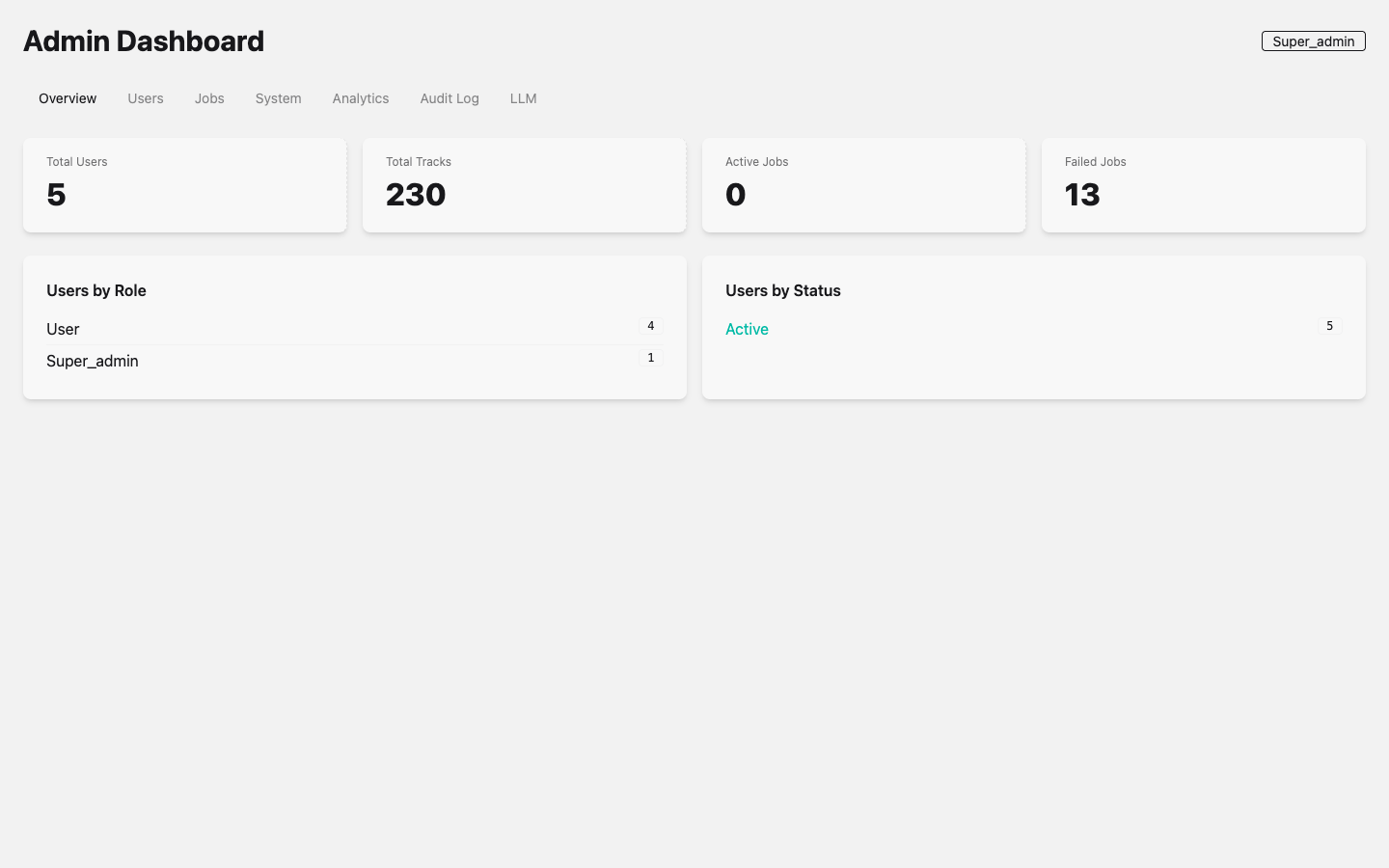 Admin Dashboard showing system metrics. The current user’s role badge (Super_admin) is displayed in the top-right corner, reflecting that
 super_admin also grants access to platform admin features.
Role Hierarchy
SFA uses six user roles in ascending privilege order:
| Tier | Role | Description |
|---|---|---|
| 1 | user |
Standard registered user. Accesses own tracks, settings, AI agents. |
| 2 | pro |
Pro subscriber. Same access as user plus premium features. |
| 3 | enterprise |
Enterprise license. Extended limits and team features. |
| 4 | admin |
Site administrator. Accesses admin dashboard, manages all users and jobs. |
| 5 | super_admin |
Elevated administrator. All admin features plus LLM system key management and platform library access. |
| 6 | platform_admin |
Highest tier. Full platform library access plus all super_admin capabilities. |
Roles are stored in the users.role column as strings with an explicit database-level CHECK constraint (see Enabling platform_admin).
Default role on registration: user.
Platform Library
LiveView: SoundForgeWeb.CombinedLibraryLive
Route: GET /platform/library
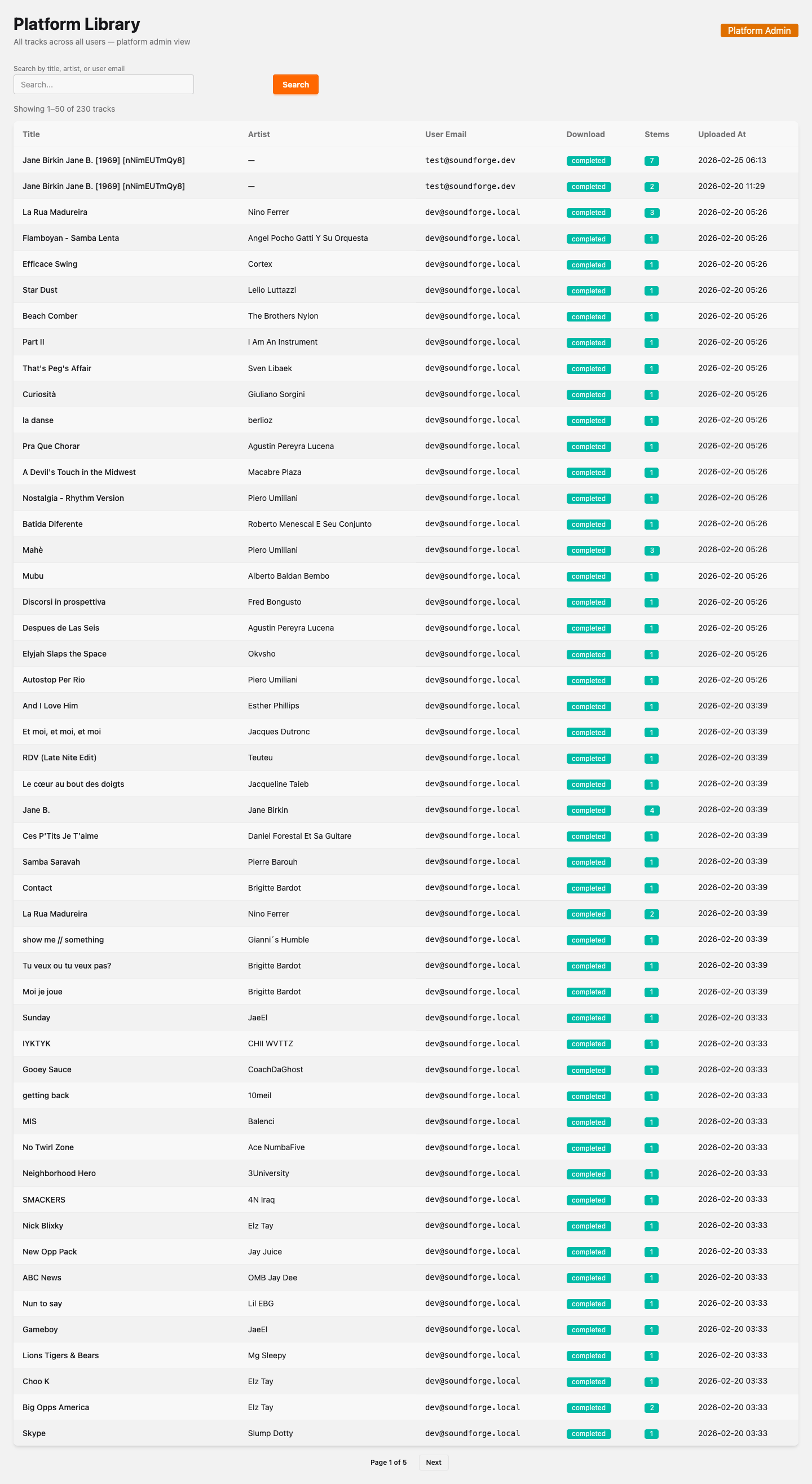 Platform Library admin view showing all 230 tracks across all users in a dense zebra-striped table. Columns: Title, Artist, User Email, Download status (colored badges), Stems count (green badges), and Uploaded At timestamps. Users visible include dev@soundforge.local and test@soundforge.dev. Search bar and “Platform Admin” warning badge appear at top. Paginated (Page 1 of 5, 230 total tracks).
The Platform Library is a read-only table view powered by Admin.all_tracks_paginated/1. It displays:
Table Columns
| Column | Description |
|---|---|
| Title | Track title from Spotify metadata, truncated at max-width. |
| Artist | Artist name from Spotify metadata, truncated at max-width. |
| User Email | Email of the user who imported the track (cross-tenant join). |
| Download | Colored badge reflecting the most recent DownloadJob status for the track. |
| Stems | Count of distinct ProcessingJob records for the track, shown as a green badge when > 0. |
| Uploaded At | inserted_at timestamp formatted as YYYY-MM-DD HH:MM. |
Download Status Badges
| Status | Badge Color | Meaning |
|---|---|---|
completed |
Green (badge-success) |
Audio file downloaded successfully. |
running |
Blue (badge-info) |
Download job currently in progress. |
failed |
Red (badge-error) |
Download job failed. |
pending |
Yellow (badge-warning) |
Download job queued, not yet started. |
none |
Ghost (neutral) | No download job exists for this track. |
Search
The search bar filters across three fields simultaneously:
- Track title (
ILIKE) - Artist name (
ILIKE) - User email (
ILIKE)
Search is debounced at 300ms and updates the URL via push_patch so results are bookmarkable and shareable:
/platform/library?search=radiohead&page=1
Clearing the search field resets to /platform/library.
Pagination
Results are paginated at 50 tracks per page. The pagination control shows the current page and total pages, with Prev/Next buttons. The current range and total count are displayed above the table:
Showing 1–50 of 230 tracks
Underlying Query
The Platform Library is backed by SoundForge.Admin.all_tracks_paginated/1:
Admin.all_tracks_paginated(
  page: 1,
  per_page: 50,
  search: "radiohead"
)
# Returns: %{tracks: [...], total: 4, page: 1, per_page: 50}
The query joins tracks to users (for email), download_jobs (for status), and processing_jobs (for stem count). Results are ordered by inserted_at DESC.
Access Control
Router Plug
Platform routes are grouped in their own scope "/platform" in router.ex:
# router.ex
scope "/platform", SoundForgeWeb do
  pipe_through [:browser, :require_authenticated_user, :require_platform_admin]

  live "/library", CombinedLibraryLive, :index
end
The require_platform_admin plug is defined in SoundForgeWeb.UserAuth:
def require_platform_admin(conn, _opts) do
  role = conn.assigns.current_scope && conn.assigns.current_scope.role

  if role in [:platform_admin, :super_admin] do
    conn
  else
    conn
    |> put_flash(:error, "You don't have permission to access the platform area.")
    |> redirect(to: ~p"/")
    |> halt()
  end
end
Users without platform_admin or super_admin are redirected to / with a flash error. The plug halts the pipeline, so no downstream action runs.
LiveView Mount Guard
CombinedLibraryLive performs a second authorization check at mount time as a defense-in-depth measure:
defp check_platform_admin_access(socket) do
  role = socket.assigns[:current_scope] && socket.assigns.current_scope.role

  if role in [:platform_admin, :super_admin] do
    :ok
  else
    :error
  end
end
If this check fails, the LiveView redirects to / with a flash error before rendering any content.
Roles That Have Access
Both platform_admin and super_admin have access to /platform/library. This allows super_admin operators (who manage LLM keys and advanced admin settings) to also use the platform library without needing a separate role upgrade.
Enabling platform_admin
Database Constraint
The platform_admin value was added to the users.role CHECK constraint in migration 20260225120000_add_platform_admin_role.exs:
defmodule SoundForge.Repo.Migrations.AddPlatformAdminRole do
  use Ecto.Migration

  def up do
    execute "ALTER TABLE users DROP CONSTRAINT IF EXISTS users_role_check"

    execute """
    ALTER TABLE users
      ADD CONSTRAINT users_role_check
      CHECK (role IN ('user','pro','enterprise','admin','super_admin','platform_admin'))
    """
  end

  def down do
    execute "ALTER TABLE users DROP CONSTRAINT IF EXISTS users_role_check"

    execute """
    ALTER TABLE users
      ADD CONSTRAINT users_role_check
      CHECK (role IN ('user','pro','enterprise','admin','super_admin'))
    """
  end
end
Schema Definition
The Ecto schema in SoundForge.Accounts.User defines the role as an Ecto.Enum:
field :role, Ecto.Enum,
  values: [:user, :pro, :enterprise, :admin, :super_admin, :platform_admin],
  default: :user
Granting the Role
There is no UI for granting platform_admin; it must be set directly in the database by an operator:
UPDATE users SET role = 'platform_admin' WHERE email = 'operator@example.com';
Or using iex with a running Phoenix server:
user = SoundForge.Accounts.get_user_by_email("operator@example.com")
SoundForge.Repo.update!(Ecto.Changeset.change(user, role: :platform_admin))
Verify the change:
SELECT email, role FROM users WHERE role = 'platform_admin';
See Also
- Admin — Standard admin dashboard, user management, audit logs
- Architecture Overview
- Migration:
priv/repo/migrations/20260225120000_add_platform_admin_role.exs - LiveView:
lib/sound_forge_web/live/combined_library_live.ex - Auth plug:
lib/sound_forge_web/user_auth.ex—require_platform_admin/2 - Admin context:
lib/sound_forge/admin.ex—all_tracks_paginated/1